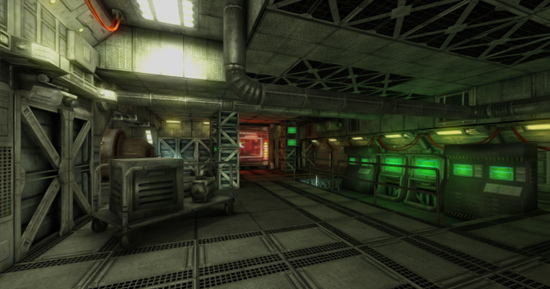
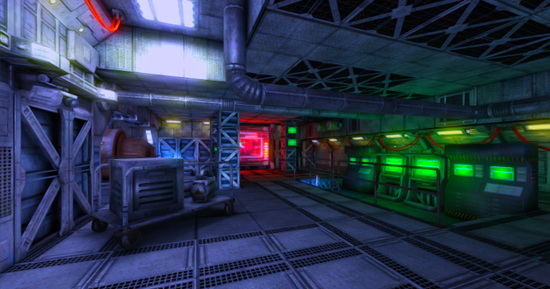
 As with the other image effects, this effect is only available in Unity Pro and you must have the Pro Standard Assets installed before it becomes available.跟其他图像处理特效一样,该特效目前只在Unity Pro版本中有效,而且在使用之前必须要安装Pro Standard Assets。
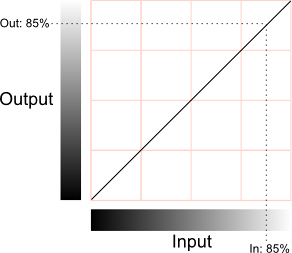 The horizontal axis represents the input level and the vertical represents the output level. Any point on the line specifies the output value that a given input is mapped to during processing. When the "curve" is the default straight line ***nning from bottom-left to top-right, the input value is mapped to an identical output value, which will leave the pixel unchanged. However, the curve can be redrawn to re-map the brightness levels as required. A simple example is when the line goes diagonally from top-left to bottom-right:-X轴显示输入值,Y轴显示输出值,线上的任意一个点都表示实时的输出输入对应关系。当曲线是默认的一条从左下角到右上角的直线时,意味着输入的值被映射到相同的输出值,像素值将保持不变。当然,曲线可以改变,以重新映射所需的亮度级。比如这样一个简单的例子,曲线沿对角线从左上角到右下角。
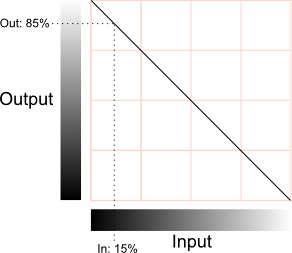 In this case, the pixel's brightness will be inverted; 0% will map to 100%, 25% to 75% and vice versa. If this is applied to all color channels then the image will be like a photographic negative of the original.在这种情况下,像素的亮度将被反转,0%将映射到100%,25%至75%,反之亦然。如果这是对所有颜色通道的操作,图像会像照相底片一样反转。
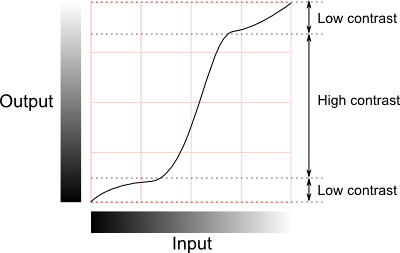
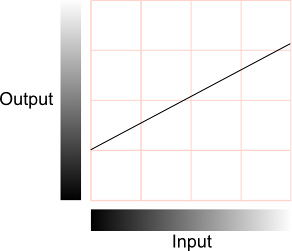 This has the effect of reducing the contrast, since the differences between pixel values in the output are necessarily smaller than those in the input (indeed, two slightly different input values may actually get mapped to the same output value). Note that since the image no longer spans the full range of output values, it is possible to slide the curve up and down the range, resulting in an image which is brighter or darker overall (the average brightness is sometimes called the "sit" point and is the parameter adjusted by the brightness control on a TV set). Reduced contrast can give the impression of gloom, fog or a dazzling light source in a scene, depending on the overall brightness.这具有减小对比度的效果,因为在输出像素值之间的差异是必然小于输入(事实上,两个略微不同的输入值实际上可能映射到相同的输出值)。需要注意的是,由于图像不再包含在完整的输出值范围内,如果我们上下调整曲线,将使图像整体上更亮或更暗(平均亮度有时也被称为"sit"点,这个点的调整就像我们在电视机上调亮度旋钮)。在一个场景中,在总亮度确定的情况下降低对比度给人一种的阴霾,雾或发出耀眼的光源的感觉。It is not necessary to reduce the contrast across the whole range of brightness levels. The curve's slope can vary along its length, with the shallower parts corresponding to ranges of reduced contrast. In between the shallow parts, the slope may be steeper than the default, and the contrast will actually increase in these ranges. Changing the curve like this gives a useful way to increase contrast in some parts of the image while reducing it in areas where the detail is less important:-我们不必要在整个亮度范围内降低对比度,曲线的斜率可以根据它的长度改变。平坦的部分代表更低的对比度,而在两个平坦曲线之间也可以有陡峭的部分,这个陡峭的部分可以比常规的更加剧烈,从而升高这一部分的对比度。调整曲线像下面这张图这样,可以让物体的某个重要的部分对比度增高,来降低那些不太重要的部分。
 Colour Effects 颜色效果If the curves are set identically for each color channel (red, green and blue) then the changes will mainly affect the brightness of pixels while their colors remain relatively unchanged. However, if the curves are set differently for each channel then the colors can change dramatically. Many complex interactions between the color channels are possible but some basic insight can be gained from the following diagram:-如果曲线同时作用于三个颜色通道(红绿蓝),曲线将只影响到亮度,颜色将不会改变。曲线设定在任何单独的颜色通道将使这种颜色剧烈改变。有很多颜色通道相互作用的例子但是下面这张图显示了通道之间作用的基本方式。
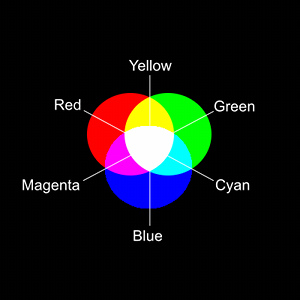 As explained in the section above, a reduction of contrast can accompany an increase or reduction in the overall brightness. If, say, the red channel is brightened then a red tint will be visible in the image. If it is darkened then the image will be tinted towards cyan (since this color is obtained by combining the other two primaries, green and blue).正如前面解释的,对比度的降低将同时降低总体亮度。这样,如果我们提高红色通道,图像将显现额外的红色;反之,图像将呈现更多的青色(青色由另外两种基本色混合而成:绿+蓝)
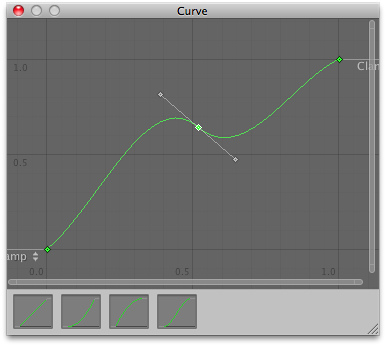 At the bottom of the window are a number of presets for common curves. However, you can also alter the curve by manipulating the key points. Right clicking on the curve line will add a new key point which can be dragged around with the mouse. If you right click on one of the points, you will see a contextual menu that gives several options for editing the curve. As well as allowing you to delete the key, there are four options that determine how it will affect the shape of the curve:-窗口底部列出了常见的curve类型,你可以调节控制点改变曲线。右击曲线加入新的控制点,左键可以拖动它,如果你右击控制点,你将会看见一个菜单,里面列出了编辑曲线的可用操作。你也可以删除控制点,选择四种选项之一决定删除操作影响到曲线的方式。 Auto: the curve will pass through the point and its shape will be adjusted to keep the curvature smooth between neighbouring points.
| 欢迎光临 纳金网 (http://go.narkii.com/club/) | Powered by Discuz! X2.5 |