 Skinned cloth in the scene view and in the inspector.
 hysics->Skinned Cloth.蒙皮布料组件与蒙皮网格渲染组件一起模拟角色身上的衣服。如果你的动画角色使用了蒙皮网络渲染,那么你可以为其增加一个蒙皮布料来让其更真实。只需要选择具有蒙皮网络渲染组件的物件,使用Component->hysics->Skinned Cloth操作来增加蒙皮布料。What the SkinnedCloth component does, is to take the vertex output from the SkinnedMeshRenderer and apply clothing simulation to that. The SkinnedCloth component has a set of per-vertex coefficients, which define how free the simulated cloth can move with respect to the skinned mesh.当使用蒙皮布料组件时,它将从蒙皮网格渲染组件中获取顶点,并根据这些顶点来模拟布料。蒙皮布料可以对每个顶点设置参数,这些参数定义模拟布料相对蒙皮移动的自由度。These coefficients can be visually edited using the scene view and the inspector, when the game object with the SkinnedCloth component is selected. There are two editing modes, selection and vertex painting. In selection mode, you click on vertices in the scene view to select them, and then edit their coefficients in the inspector. In vertex paining mode, you set the coefficient values you want in the inspector, enable the "paint" button next to those coefficients you want to change, and click on the vertices to apply the values to those.当你在场景或检视面板中选中了一个带有蒙皮布料组件的对象时,这些参数将被可见的设置。有两种设置方式,选择模式和喷涂模式,在选择模式,你在场景中选择相应的顶点,来设置其参数。在喷涂模式,你设置好参数后,点击对应的paint按钮,然后选择顶点来设置这些参数。Note that skinned cloth simulation is only driven by the vertices skinned by the SkinnedMeshRenderer, and will not otherwise interact with any colliders. This makes skinned cloth simulation much faster then the fully physical Interactive Cloth component, as it does not need to be simulated on the same frame rate and the same thread as the rest of the physics simulation.记住,蒙皮布料只会被蒙皮网格渲染组件的蒙皮的顶点驱动,而不会和其他碰撞体交互。这使得蒙皮布料比完全的物理交互布料的模拟要快,它不需要像其它物理模拟一样,在同一线程按固定帧率模拟。You can disable or enable the skinned cloth component at any time to turn it on or off. Turning it off will switch rendering to the normal SkinnedMeshRenderer, so you can switch between these whenever needed to dynamically adjust for varying performance. You can also smoothly cross-fade between the two modes from a script using the SkinnedCloth.SetEnabledFading() method, to make the transition unnoticeable to the player.你可以在任何时候激活或冻结互动布料组件来使其开启或关闭,关闭将渲染为普通的蒙皮网格渲染,所以你可以在动态的切换来实现很多效果。采用SkinnedCloth.SetEnabledFading()方法可以使其效果平滑的淡入淡出,来使得玩家忽视其切换。
 【The SkinnedCloth inspector 蒙皮布料检视面板】When you select a GameObject with a SkinnedCloth component, you can use the SkinnedCloth inspector to edit cloth vertex coefficients, and other properties. The inspector has three tabs:当你选择了一个具有蒙皮布料组件的对象时,你可以在蒙皮布料检视面部中编辑顶点参数和其他属性。检视面板有三个标签。
 In this mode you can select vertices in the scene view, and the set their coefficients in the inspector (see the previous section for an explanation on how the cloth coefficients work). It is possible to set multiple coefficients by holding the shift key, or by dragging a rectangle with the mouse. When multiple vertices are selected, the inspector will display average values for the vertices coefficients. When you change the values, however, that coefficient will be set to the same value for all vertices. If you switch the scene view to wireframe mode, you will also be able to see and to select back-facing vertices, this can be useful when you want to select full parts of the character.在此模式下,你可以在场景视图中选择订单,然后在检视面板照哦功能设置参数(参考前一节对参数的介绍)。按住shift键或者用鼠标框选可以一次设置多个顶点的参数。当你选择多个顶点时,检视面板将显示平均值。当你改变这个值,那么所有的顶点都会被设为同样的值。当场景视图为线框模式时,你可以看到和选择背面的顶点,这种技巧在选择角色的整个部件时比较有用。To help you understand which values the coefficients have for all the vertices, you can click the eye icon next to a coefficient field, to make the editor visualize that coefficient in the scene view. This shows the vertices with the lowest value of that coefficient in a green tint, mid-range values will be yellow, and the highest values get a blue tint. The colors scale is always chosen relative to the used value range of that coefficient, and is independent of absolute values.为了帮助你弄清楚所有顶点的参数值分布,你可以选择参数区域边的眼睛图标,编辑器会将这些参数可视化。值小的顶点渲染为绿色,中间范围内的为黄色,最大的为蓝色。这些颜色范围取决于已设置参数的范围。
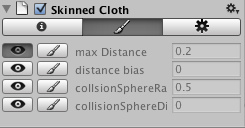 Similar to the vertex selection, this is a tool to help you configure the vertex coefficient values. Unlike vertex selection, you don't need to click on a vertex before changing a value - in this mode, you just enter the values you want to set, enable the paint***sh toggle next to the coefficients you want to change, and then click on all vertices you want to set that value for.类似于顶点选择,这个工具帮助你配置顶点参数。不同于顶点选择操作方式,你不需要在改变数值之前选中顶点。在这种模式下,你只需要设置好相应的值,激活参数边的画笔开关,然后选中你要设置的顶点。
 The third tab lets you configure various properties of the skinned cloth:第三个标签用于配置蒙皮布料的各种属性。-------------------------------------------------------------------------- Bending Stiffness 抗弯刚度
| 欢迎光临 纳金网 (http://go.narkii.com/club/) | Powered by Discuz! X2.5 |